 Solti
SoltiYour AI coding agents, working as a team
Run Claude Code, Codex, Gemini CLI and OpenCode side by side on one canvas. A maestro delegates, agents message each other, and pipelines loop until the reviewer approves. You watch, approve and steer.

One canvas. A whole team.
Running four agents in four terminal windows is chaos. Here they share one canvas, talk through ropes, and hand work to each other.
A maestro that delegates
One agent splits the task and hands it to specialists. They report back with canvas_done.
Ropes are permissions
An agent only messages, reads or delegates to what it is roped to: terminals, notes, browser portals, diffs.
A git worktree per agent
Each agent works on its own branch, so no one overwrites anyone. Review, merge or open a PR from the Diff node.
Approve from your phone
Pair your phone with a QR code: watch terminals, type, approve requests, interrupt.
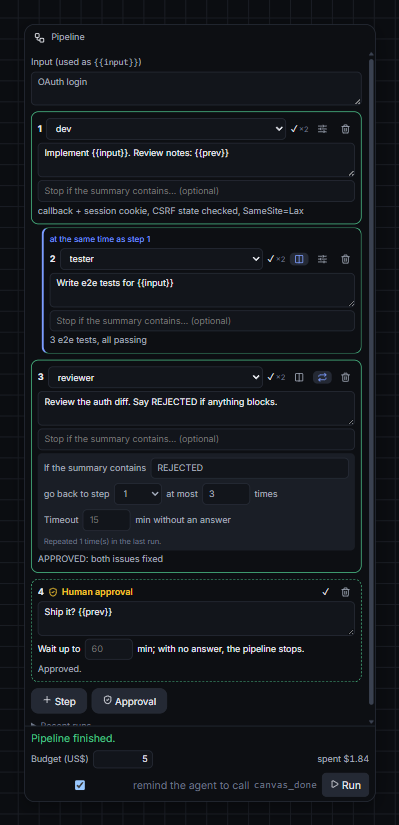
Pipelines that loop until it's right
- Parallel: dev and tester at the same time; the next step gets both results.
- Loops: if the reviewer says
REJECTED, go back to the dev with the review, at most 3 times. - Human approval: pause before shipping and approve in the app or on your phone.
- Timeouts, a budget, recent runs, and a restore point before every run.
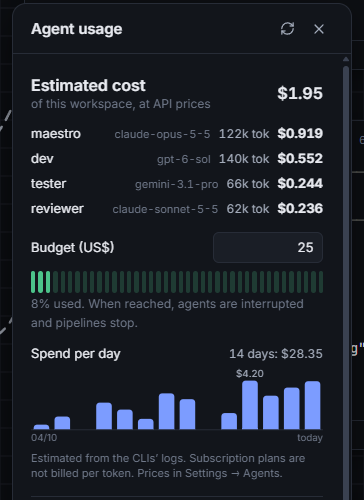
See the cost. Cap the spend.
- Tokens and estimated cost per agent, from each CLI's own log.
- A budget per workspace or pipeline: when it is reached, agents are interrupted and pipelines stop.
- Spend per day for the last 14 days.
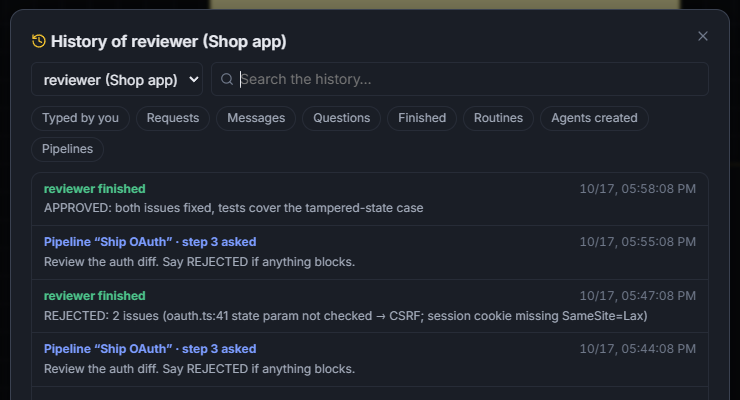
Know what every agent did
- A searchable timeline per agent: what you typed, what pipelines asked, messages, conclusions.
- Notifications when an agent finishes or needs you. Clicking one takes you to the terminal.
- Restore points of every workspace.
Download
Pick your system. Every version and what changed: Releases · Changelog.
Windows 10 / 11
Installer for x64. Updates itself.
Download .exeNot code-signed yet: on the SmartScreen warning, click More info → Run anyway.
Or with Scoop: scoop bucket add solti https://github.com/jvyctor/solti then scoop install solti
macOS
Apple Silicon (M1–M4) or Intel.
Download for Apple SiliconNot notarized yet: the first time, right-click the app → Open.
Or with Homebrew: brew tap jvyctor/solti https://github.com/jvyctor/solti then brew install --cask solti
Linux
x64 · .deb for Debian/Ubuntu, .AppImage for everything else.
AppImage: chmod +x Solti-*.AppImage. On Ubuntu 23.10+, prefer the .deb.
No agent CLI yet? Click Try the demo in the app: it runs on simulated agents. To work for real, you need at least one agent CLI installed and logged in: Claude Code, Codex, Gemini CLI, OpenCode or Antigravity. The welcome screen checks each one and connects it with one click.
Solti Teams
Solti stays free and open source. For teams that run agents together, we are exploring a paid plan. Your votes decide what gets built first.
Join the waitlistOn GitHub Discussions: react with 👍, and tell us your team size and what you would pay for. No forms, no tracking.
- 🤝 Shared workspaces: the same canvas, agents and pipelines for the whole team
- 💸 Team budgets and cost reports per person, project and model
- ✅ Approvals from Slack or your phone: any teammate can unblock a run
- 🧾 Audit trail: who asked which agent to do what
- ☁️ Cloud runners: pipelines keep going while your laptop sleeps
Enjoying it? Star it on GitHub ⭐
Stars help other developers find Solti. Issues, ideas and pull requests are very welcome.
★ Star on GitHub